

Architecture
This page describes the current xopc system architecture. It is based on the runtime wiring in src/gateway/service.ts, src/agent/service.ts, src/channels/manager.ts, src/session/store.ts, the Hono gateway routes, and the package build scripts.
Last verified: 2026-07-09.
System Architecture
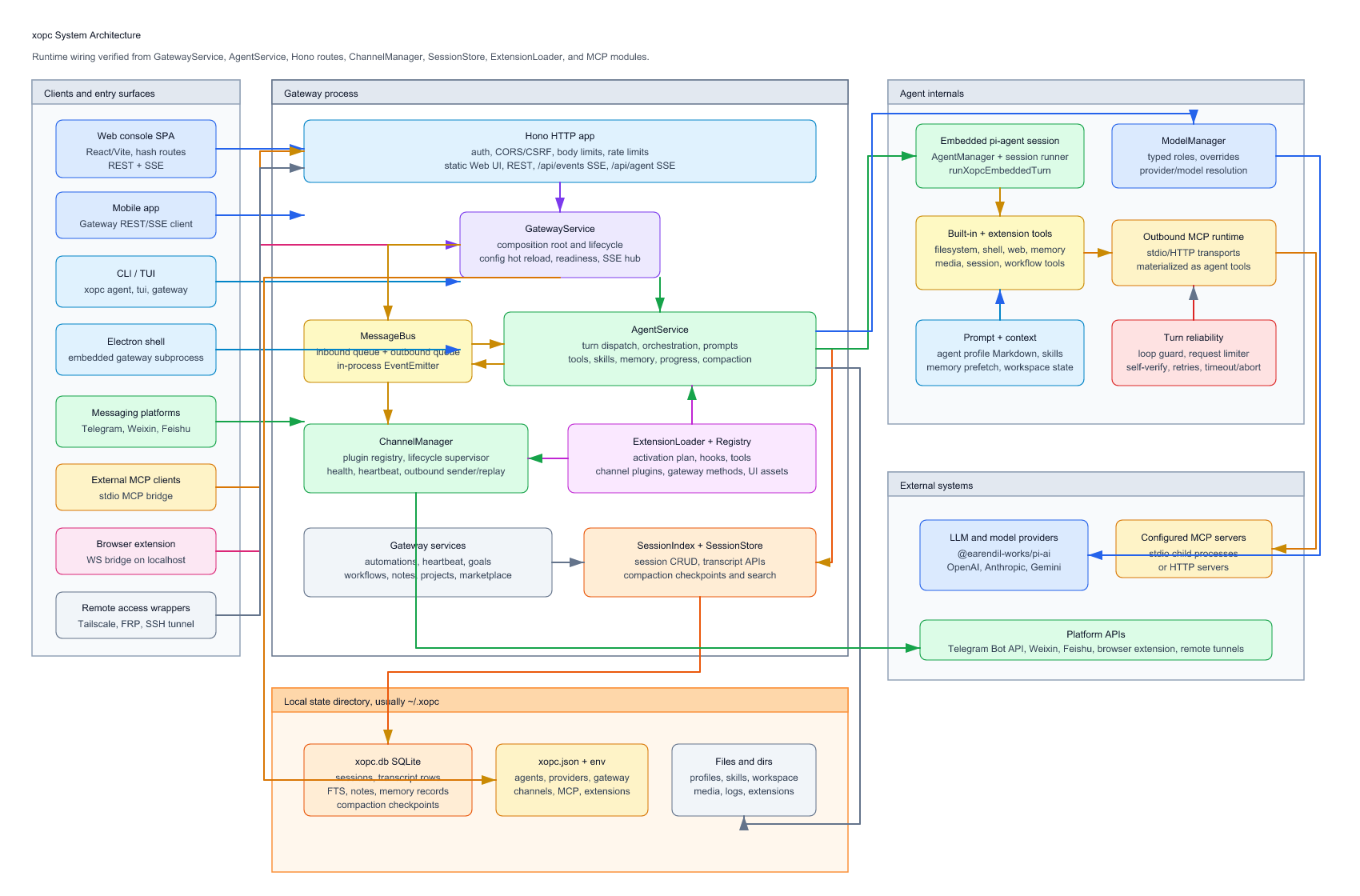
The draw.io source for the current architecture diagram is architecture.drawio. The rendered images are architecture.png and architecture.svg. Open the draw.io source with diagrams.net or the draw.io desktop app when you need to edit the diagram, then export the image again.
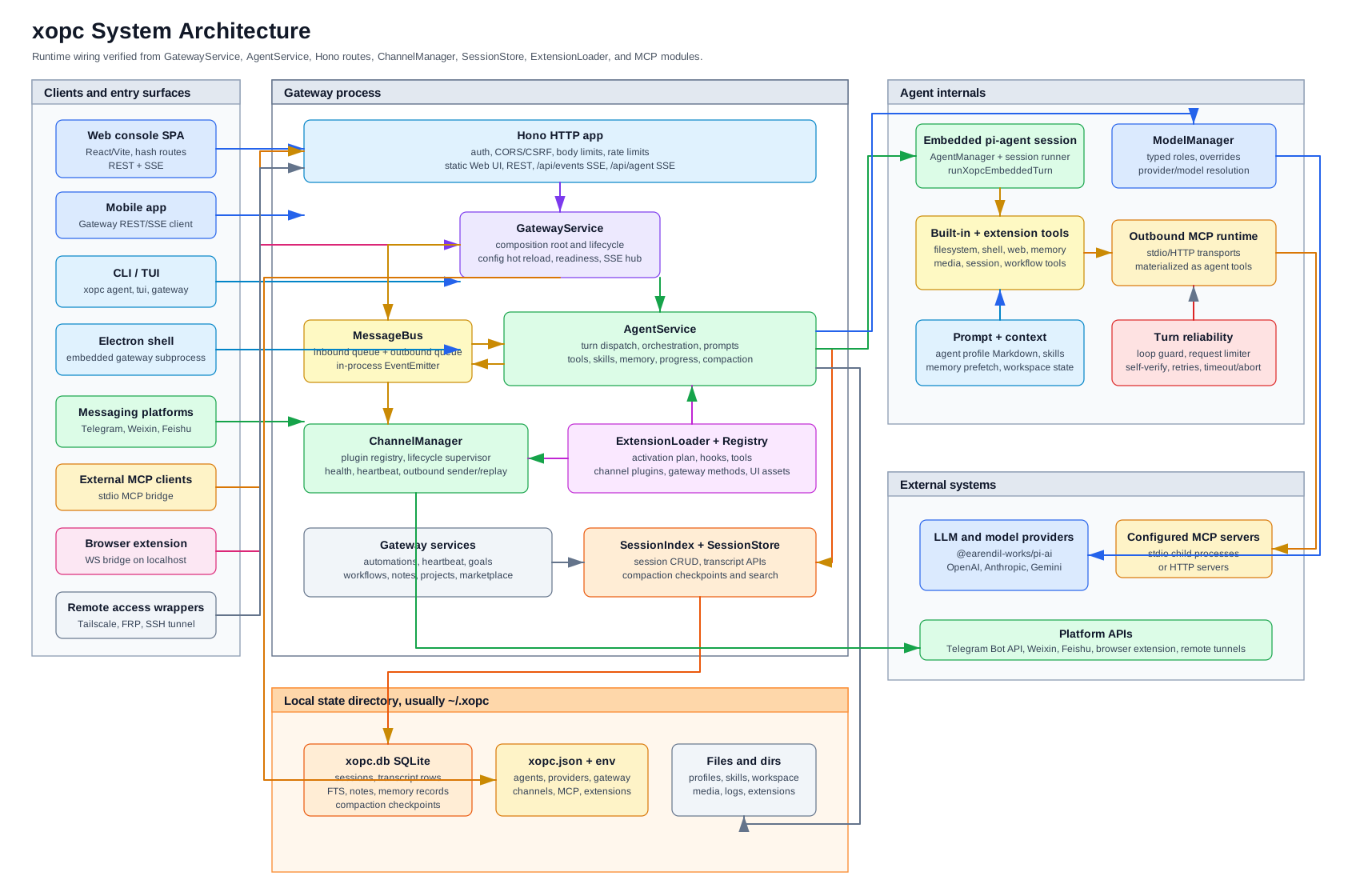
At runtime, the gateway process is the main composition root. CLI/TUI and the Electron shell can start or talk to it, the Web console and mobile app use its HTTP/SSE API, channel extensions publish inbound messages through the in-process bus, and the agent runtime persists all session state through SQLite.
Runtime Composition
| Layer | Main code | Responsibility |
|---|---|---|
| CLI and service bootstrap | src/cli/, src/daemon/, electron/ | Starts foreground gateway, installs or controls a background service, runs CLI/TUI turns, and hosts the Electron shell. |
| HTTP gateway | src/gateway/server.ts, src/gateway/hono/ | Hono server, auth, CORS/CSRF checks, rate limits, REST routes, /api/events broadcast SSE, /api/agent streaming SSE, and static Web console serving. |
| Gateway composition root | src/gateway/service.ts | Owns MessageBus, ChannelManager, AgentService, SessionIndex, automations, notes, projects, goals, workflows, extension loading, Gateway SSE hub, and config hot reload. |
| Agent runtime | src/agent/service.ts, src/agent/embedded/, src/agent/orchestration/ | Builds per-session agents, prompts, tools, memory, skills, MCP tools, model selection, streaming events, compaction, and direct/webchat turn dispatch. |
| Channels | src/channels/, extensions/telegram, extensions/weixin, extensions/feishu | Channel plugins receive external messages, normalize routing/session keys, publish inbound bus messages, and send outbound replies. |
| Extension runtime | src/extensions/, extensions/* | Loads extension manifests and code by activation plan, then registers hooks, tools, channel plugins, gateway methods, and extension UI assets. |
| State and storage | src/storage/sqlite/, src/session/, src/config/ | SQLite database, session metadata/transcripts/FTS, compaction checkpoints, notes and memory records, JSON config, agent profiles, workspace files, media, logs, and extension state. |
| User understanding | src/knowledge/, src/agent/memory/understanding/, src/agent/memory/context/ | Evidence ingestion, governed synthesis, deduplicated understanding records, and bounded per-turn context planning. See User understanding. |
| External integrations | src/providers/, src/agent/mcp/, src/mcp/, src/browser/, src/remote-access/ | LLM providers through @earendil-works/pi-ai, outbound MCP tools over stdio/HTTP, inbound channel MCP bridge, browser extension WebSocket bridge, and optional Tailscale/FRP/SSH exposure. |
Main Data Flows
Web Chat
- The Web console is built from
web/and served fromdist/gateway/static/root. - Chat submits
POST /api/agentwithAccept: text/event-stream. createAgentSSEHandlerresolves the webchat session key and callsGatewayService.runAgent.GatewayAgentRunnerdrivesAgentService.turnDispatcher.processDirectStreaming.- The embedded pi-agent session runs the model/tools and emits stream events back to SSE.
SessionStorepersists transcript rows and metadata to~/.xopc/xopc.db.- Gateway broadcast events update other UI state through
/api/events.
Channel Message
- A channel extension such as Telegram, Weixin, or Feishu receives a platform event.
- The plugin validates account policy/pairing, normalizes attachments and routing, then calls
MessageBus.publishInbound. AgentServiceconsumes the inbound queue inInboundLoop.- The agent runs the turn, persists transcript rows, and publishes outbound messages through
OutboundCoordinator. GatewayService.startOutboundProcessorconsumesMessageBus.consumeOutboundand delegates toChannelManager.send.ChannelOutboundSendercalls the selected plugin's outbound implementation and can replay persisted outbound messages after startup.
CLI/TUI
CLI commands are registered through src/cli/registry.ts. The agent and tui commands can run direct turns without the HTTP server, while gateway starts the same GatewayService/Hono stack used by the Web console and mobile app.
Automations, Goals, Heartbeat, and Workflows
GatewayService wires AutomationService, HeartbeatService, GoalRunner, PersistentGoalService, and WorkflowRunService around the same AgentService and SessionStore. Scheduled or event-triggered work is executed as agent turns with normal transcript persistence and normal Gateway SSE status events.
Agent Runtime
AgentService is no longer a single narrow "prompt plus LLM" class. It is a composition root for:
AgentManager: per-session embedded pi-agent instances.ModelManager: default model, per-session overrides, typed model roles, and resolved model metadata.TurnDispatcher: direct, streaming, webchat steering, clarify, and SSE event injection.AgentOrchestrator: turn execution, lifecycle events, feedback, persistence, and compaction.OutboundCoordinator: final response publishing, channel hooks, and post-turn goal handling.SessionConfigService,SessionHydrator, andSessionInspector: per-session model/thinking/workspace config, hydration, compaction, and context reports.PersistentGoalService:/goalcontinuation scheduling and post-turn verdicts.- Prompt, memory, skills, tools, media, MCP tools, loop guards, self-verify, request limits, and progress feedback modules.
The embedded turn path uses runXopcEmbeddedTurn, which acquires or reuses an embedded session runner, wraps the model stream function with xopc extensions and loop guards, runs the pi-agent session with timeout/abort support, then releases the runner.
Storage Model
The authoritative runtime store is SQLite at ~/.xopc/xopc.db, opened by the gateway via openXopcDatabase(). SessionStore delegates session CRUD, transcript append/load, FTS search, compaction checkpoints, and metadata updates to repositories under src/storage/sqlite/.
Important boundaries:
~/.xopc/xopc.jsonremains the primary configuration file, with environment variables for secrets and overrides.- Agent profile Markdown, skills, shared user memory, extension state, logs, media, and workspaces live under the state directory, usually
~/.xopc. - The Markdown workspace is not the transcript store. Model input is loaded from SQLite through
SessionStore.loadMessages, which applies transcript hygiene before sending history to the LLM.
Channels and Extensions
Channels are runtime plugins managed by ChannelManager. The current source tree ships channel implementations as extension packages under extensions/, notably Telegram, Weixin, and Feishu. Startup goes through ExtensionLoader, which loads eligible extensions and registers their ChannelPlugin instances with ChannelManager.
Extensions can contribute:
- agent tools and hooks,
- channel plugins,
- gateway methods and routes,
- extension UI assets served by the gateway,
- CLI commands,
- image, voice, STT, provider, or other integration surfaces depending on the extension.
The gateway also supports deferred extension loading after readiness, so not all extension code is loaded before the HTTP server starts listening.
MCP
xopc has two MCP directions:
- Outbound MCP for the agent:
src/agent/mcp/materializes configured MCP server tools, resources, and prompts into agent tools. Transports include stdio and HTTP. - Inbound channel MCP:
src/mcp/exposes a stdio MCP server that talks back to the gateway REST/SSE API throughXopcChannelBridge, allowing external MCP clients to inspect conversations, read messages, send messages, poll events, and respond to approvals.
These are intentionally separate: outbound MCP extends what the agent can call, while inbound MCP exposes selected xopc/channel capabilities to external tools.
Gateway API Surface
Core authenticated routes are registered first:
- status and health,
- agent streaming,
- sessions,
- memory,
- projects,
- search.
Additional route groups are mounted through lazy route bundles and include agents, automations, browser, channels, connectors/MCP, config, goals, logs, models, notes, shares, skills, update, voice, workflows, workspace, and related settings surfaces.
Broadcast events flow through GatewaySseHub and /api/events. Agent run streaming flows through /api/agent and /api/agent/resume.
Build and Distribution
The package is ESM TypeScript on Node.js 22+. tsdown builds unbundled Node output under dist/src/** and extension output under dist/extensions/**. Declaration files are emitted by tsc. The Web console is a separate Vite/React package under web/; its production build is copied to the gateway static root.
Packaging surfaces include:
- npm CLI binary:
xopc -> dist/src/cli/bin.js, - foreground/background gateway service,
- Electron desktop shell with an embedded gateway subprocess,
- Web console and mobile client talking to the gateway API,
- optional Docker and remote access wrappers.
Tech Stack
| Layer | Technology |
|---|---|
| Runtime | Node.js 22+ |
| Language | TypeScript |
| LLM SDK | @earendil-works/pi-ai |
| Agent Framework | @earendil-works/pi-agent-core |
| CLI | Commander.js |
| HTTP Server | Hono |
| Config validation | Zod |
| Tool schemas | TypeBox |
| Storage | SQLite plus FTS5 |
| Logging | Pino |
| Automations | Internal scheduler plus cron-parser |
| Web UI | React, Vite, Tailwind CSS v4, React Router, SWR, Zustand |
| Tests | Vitest |
Architecture Decisions
Long-lived structural decisions are recorded in docs/adr/:
- ADR 0002 proposes modeling user-created Local Apps as Projects with immutable releases and capability-scoped runtimes.
The invariants are enforced in CI via pnpm run depcheck. Render the current source dependency graph with pnpm run depcheck:graph, which writes docs/dependency-graph.mmd.
Changing xopc Itself
To add core tools, channels, gateway routes, or CLI commands, work in the xopc source tree and follow the repository AGENTS.md. For custom behavior that does not need to live in core, prefer extensions.