

架构
本文说明当前 xopc 的系统架构。内容基于 src/gateway/service.ts、 src/agent/service.ts、src/channels/manager.ts、src/session/store.ts、Hono 网关路由以及包构建脚本核对。
最后核对日期:2026-07-09。
系统架构
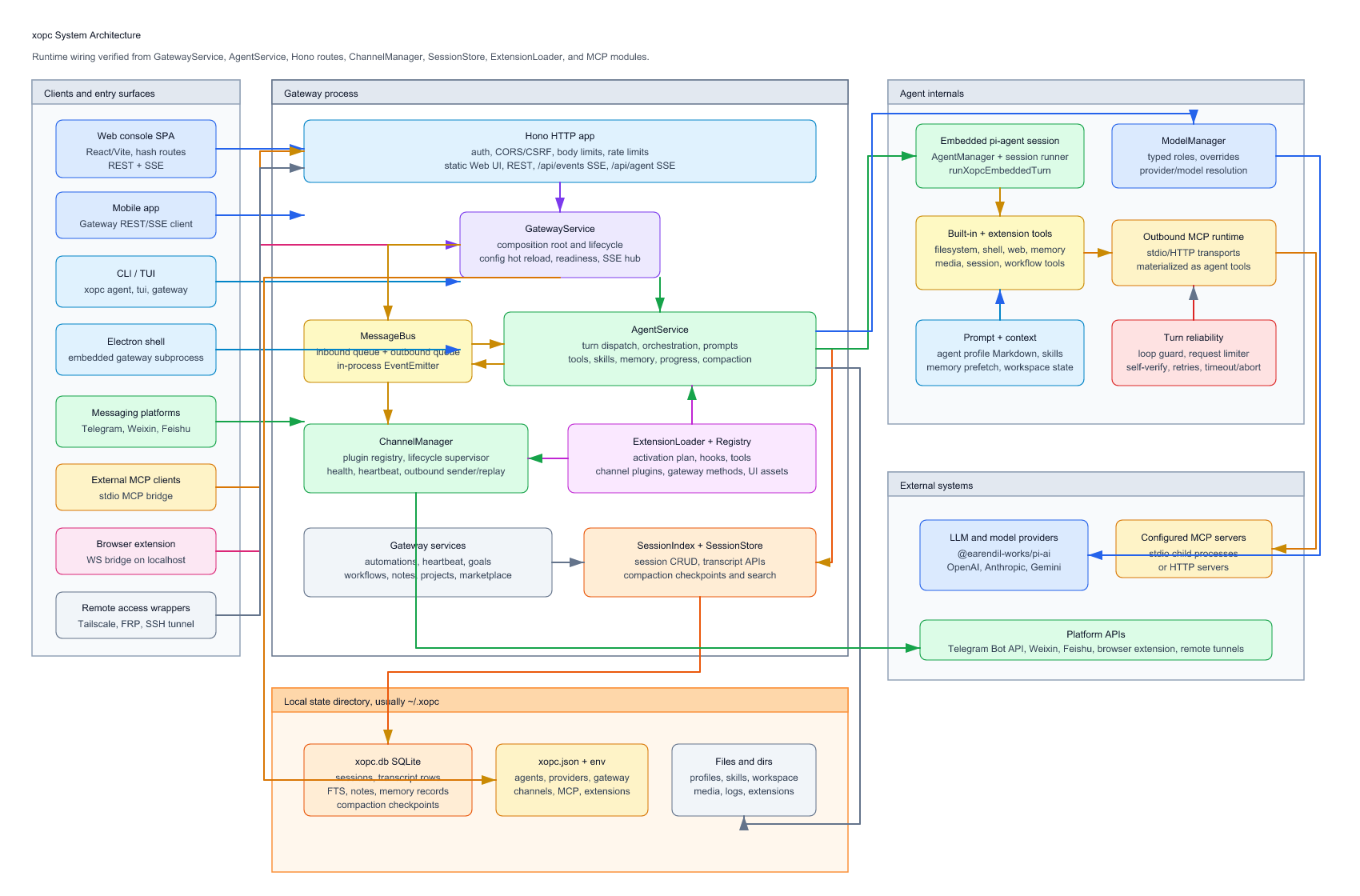
当前架构图的 draw.io 源文件是 architecture.drawio, 渲染图片是 architecture.png 和 architecture.svg。需要编辑时,请用 diagrams.net 或 draw.io 桌面版打开 draw.io 源文件,然后重新导出图片。
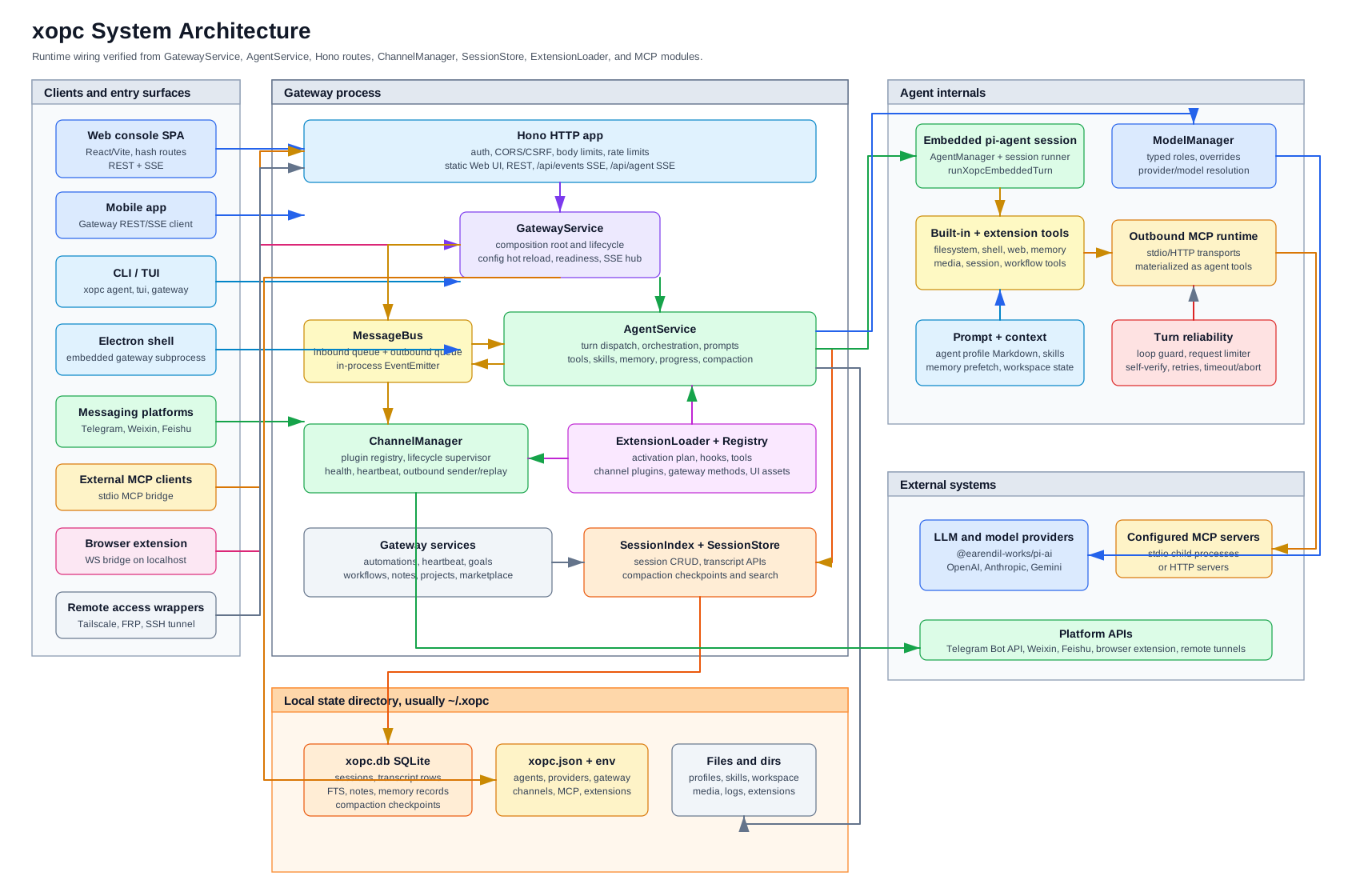
运行时,Gateway 进程是主要组合根。CLI/TUI 与 Electron shell 可以启动或访问 Gateway;Web 控制台和移动端通过 HTTP/SSE API 与 Gateway 通信;频道扩展通过 进程内消息总线发布入站消息;智能体运行时通过 SQLite 持久化会话状态。
运行时组成
| 层级 | 主要代码 | 责任 |
|---|---|---|
| CLI 与服务启动 | src/cli/、src/daemon/、electron/ | 启动前台 Gateway,安装或控制后台服务,运行 CLI/TUI 回合,并承载 Electron shell。 |
| HTTP Gateway | src/gateway/server.ts、src/gateway/hono/ | Hono 服务、认证、CORS/CSRF 检查、限流、REST 路由、/api/events 广播 SSE、/api/agent 流式 SSE,以及静态 Web 控制台。 |
| Gateway 组合根 | src/gateway/service.ts | 持有 MessageBus、ChannelManager、AgentService、SessionIndex、自动化、笔记、项目、目标、工作流、扩展加载、Gateway SSE Hub 与配置热重载。 |
| 智能体运行时 | src/agent/service.ts、src/agent/embedded/、src/agent/orchestration/ | 构建按会话划分的智能体、Prompt、工具、记忆、技能、MCP 工具、模型选择、流事件、压缩与直接/Webchat 回合调度。 |
| 频道 | src/channels/、extensions/telegram、extensions/weixin、extensions/feishu | 频道插件接收外部消息,规范化路由与 session key,发布入站总线消息,并发送出站回复。 |
| 扩展运行时 | src/extensions/、extensions/* | 按激活计划加载扩展 manifest 与代码,并注册 hooks、tools、channel plugins、gateway methods 与扩展 UI assets。 |
| 状态与存储 | src/storage/sqlite/、src/session/、src/config/ | SQLite 数据库、会话元数据/transcript/FTS、压缩检查点、笔记和记忆记录、JSON 配置、智能体 profile、workspace 文件、媒体、日志与扩展状态。 |
| 外部集成 | src/providers/、src/agent/mcp/、src/mcp/、src/browser/、src/remote-access/ | 通过 @earendil-works/pi-ai 访问 LLM providers;通过 stdio/HTTP 接入出站 MCP 工具;提供入站频道 MCP bridge、浏览器扩展 WebSocket bridge,以及可选 Tailscale/FRP/SSH 暴露层。 |
主要数据流
Web Chat
- Web 控制台由
web/构建,并从dist/gateway/static/root提供静态文件。 - Chat 以
Accept: text/event-stream提交POST /api/agent。 createAgentSSEHandler解析 webchat session key,并调用GatewayService.runAgent。GatewayAgentRunner驱动AgentService.turnDispatcher.processDirectStreaming。- 内嵌 pi-agent session 运行模型和工具,并把流式事件回传给 SSE。
SessionStore将 transcript 行和元数据持久化到~/.xopc/xopc.db。- Gateway 广播事件通过
/api/events更新其它 UI 状态。
频道消息
- Telegram、Weixin 或 Feishu 等频道扩展接收平台事件。
- 插件校验账号策略/配对状态,规范化附件和路由,然后调用
MessageBus.publishInbound。 AgentService在InboundLoop中消费入站队列。- 智能体运行回合,持久化 transcript 行,并通过
OutboundCoordinator发布出站消息。 GatewayService.startOutboundProcessor消费MessageBus.consumeOutbound,并委托给ChannelManager.send。ChannelOutboundSender调用目标插件的出站实现,并可在启动后重放已持久化的出站消息。
CLI/TUI
CLI 命令通过 src/cli/registry.ts 注册。agent 和 tui 命令可以不经过 HTTP 服务直接运行回合;gateway 命令启动的则是与 Web 控制台、移动端共用的 GatewayService/Hono 栈。
自动化、目标、心跳与工作流
GatewayService 将 AutomationService、HeartbeatService、GoalRunner、 PersistentGoalService 和 WorkflowRunService 连接到同一套 AgentService 与 SessionStore。定时或事件触发的工作会作为普通智能体回合执行,正常持久化 transcript,并通过 Gateway SSE 发送状态事件。
智能体运行时
AgentService 不是一个简单的“Prompt 加 LLM”类,而是智能体侧的组合根,负责:
AgentManager:按会话维护内嵌 pi-agent 实例。ModelManager:默认模型、会话级覆盖、typed model roles 与解析后的模型元数据。TurnDispatcher:直接回合、流式回合、Webchat steering、clarify 与 SSE 事件注入。AgentOrchestrator:回合执行、生命周期事件、反馈、持久化与压缩。OutboundCoordinator:最终响应发布、频道 hooks 与回合后的目标处理。SessionConfigService、SessionHydrator、SessionInspector:会话级模型/thinking/workspace 配置、hydration、压缩与上下文报告。PersistentGoalService:/goalcontinuation 调度与回合后判定。- Prompt、记忆、技能、工具、媒体、MCP 工具、loop guard、self-verify、request limit 与进度反馈模块。
内嵌回合路径使用 runXopcEmbeddedTurn:它获取或复用 embedded session runner, 用 xopc 扩展与 loop guard 包装模型 stream function,在 timeout/abort 支持下运行 pi-agent session,最后释放 runner。
存储模型
权威运行时存储是 ~/.xopc/xopc.db SQLite 数据库,Gateway 通过 openXopcDatabase() 打开。SessionStore 将会话 CRUD、transcript 追加/加载、 FTS 搜索、压缩检查点与元数据更新委托给 src/storage/sqlite/ 下的 repository。
重要边界:
~/.xopc/xopc.json仍是主要配置文件,环境变量用于密钥和覆盖项。- 智能体 profile Markdown、技能、记忆文件、扩展状态、日志、媒体和 workspaces 通常位于状态目录
~/.xopc下。 - Markdown workspace 不是 transcript 存储。模型输入通过
SessionStore.loadMessages从 SQLite 加载,并在发给 LLM 前应用 transcript hygiene。
频道与扩展
频道是由 ChannelManager 管理的运行时插件。当前源码树把频道实现作为 extensions/ 下的扩展包发布,主要包括 Telegram、Weixin 与 Feishu。启动时 ExtensionLoader 加载符合条件的扩展,并把它们的 ChannelPlugin 实例注册到 ChannelManager。
扩展可以贡献:
- 智能体工具和 hooks,
- 频道插件,
- gateway methods 和 routes,
- 由 Gateway 提供的扩展 UI assets,
- CLI 命令,
- 图片、语音、STT、provider 或其它集成面,取决于扩展本身。
Gateway 也支持就绪后再进行 deferred extension loading,因此并不是所有扩展代码 都会在 HTTP 服务开始监听前加载。
MCP
xopc 有两个 MCP 方向:
- 智能体出站 MCP:
src/agent/mcp/将配置的 MCP server tools、resources 与 prompts materialize 成智能体工具。Transport 包括 stdio 和 HTTP。 - 入站频道 MCP:
src/mcp/提供 stdio MCP server,通过XopcChannelBridge回连 Gateway REST/SSE API,让外部 MCP clients 可以查看 conversations、读取 messages、发送消息、poll events 和响应 approvals。
两者边界不同:出站 MCP 扩展智能体可调用能力;入站 MCP 将一部分 xopc/频道能力暴露给外部工具。
Gateway API 面
核心认证路由优先注册:
- status 和 health,
- agent streaming,
- sessions,
- memory,
- projects,
- search。
其它路由组通过 lazy route bundles 挂载,包括 agents、automations、browser、 channels、connectors/MCP、config、goals、logs、models、notes、shares、skills、 update、voice、workflows、workspace 以及相关设置页面。
广播事件通过 GatewaySseHub 和 /api/events 传递。智能体运行流通过 /api/agent 与 /api/agent/resume 传递。
构建与分发
这个包是运行在 Node.js 22+ 上的 ESM TypeScript 项目。tsdown 以 unbundle 方式将 Node 输出构建到 dist/src/**,将扩展输出构建到 dist/extensions/**。 声明文件由 tsc 生成。Web 控制台是 web/ 下独立的 Vite/React 包;生产构建会 复制到 Gateway 静态根目录。
分发入口包括:
- npm CLI binary:
xopc -> dist/src/cli/bin.js, - 前台/后台 Gateway 服务,
- 带 embedded Gateway subprocess 的 Electron 桌面 shell,
- 通过 Gateway API 通信的 Web 控制台和移动端,
- 可选 Docker 与远程访问包装层。
技术栈
| 层级 | 技术 |
|---|---|
| 运行时 | Node.js 22+ |
| 语言 | TypeScript |
| LLM SDK | @earendil-works/pi-ai |
| 智能体框架 | @earendil-works/pi-agent-core |
| CLI | Commander.js |
| HTTP Server | Hono |
| 配置校验 | Zod |
| 工具 schema | TypeBox |
| 存储 | SQLite + FTS5 |
| 日志 | Pino |
| 自动化 | 内置调度器 + cron-parser |
| Web UI | React、Vite、Tailwind CSS v4、React Router、SWR、Zustand |
| 测试 | Vitest |
架构决策
长期结构性决策记录在 docs/adr/:
- ADR 0001 描述了 AgentService 的拆分,包括
SessionStateBag、OutboundCoordinator、TurnDispatcher、PersistentGoalService、SessionConfigService、SessionHydrator、SessionInspector与AgentInstanceGateway等协作者。
这些不变量通过 CI 中的 pnpm run depcheck 校验。可以运行 pnpm run depcheck:graph 生成当前源码依赖图,输出到 docs/dependency-graph.mmd。
修改 xopc 本体
如果要增加核心工具、频道、Gateway 路由或 CLI 命令,请在 xopc 源码树内开发,并遵循仓库根目录的 AGENTS.md。如果自定义行为不需要进入核心,优先使用扩展。